
Both work. The Ryzen 7 9800X3D is an 8-core, 16-thread AM5 chip with a 120W TDP. A quality dual-tower air cooler handles it in gaming. A 240mm or 360mm all-in-one (AIO) liquid cooler adds thermal headroom and usually runs quieter under long, heavy loads. The short version: buy a dual-tower air cooler for simple and cheap. Buy a 360mm AIO for the quietest, most consistent results.
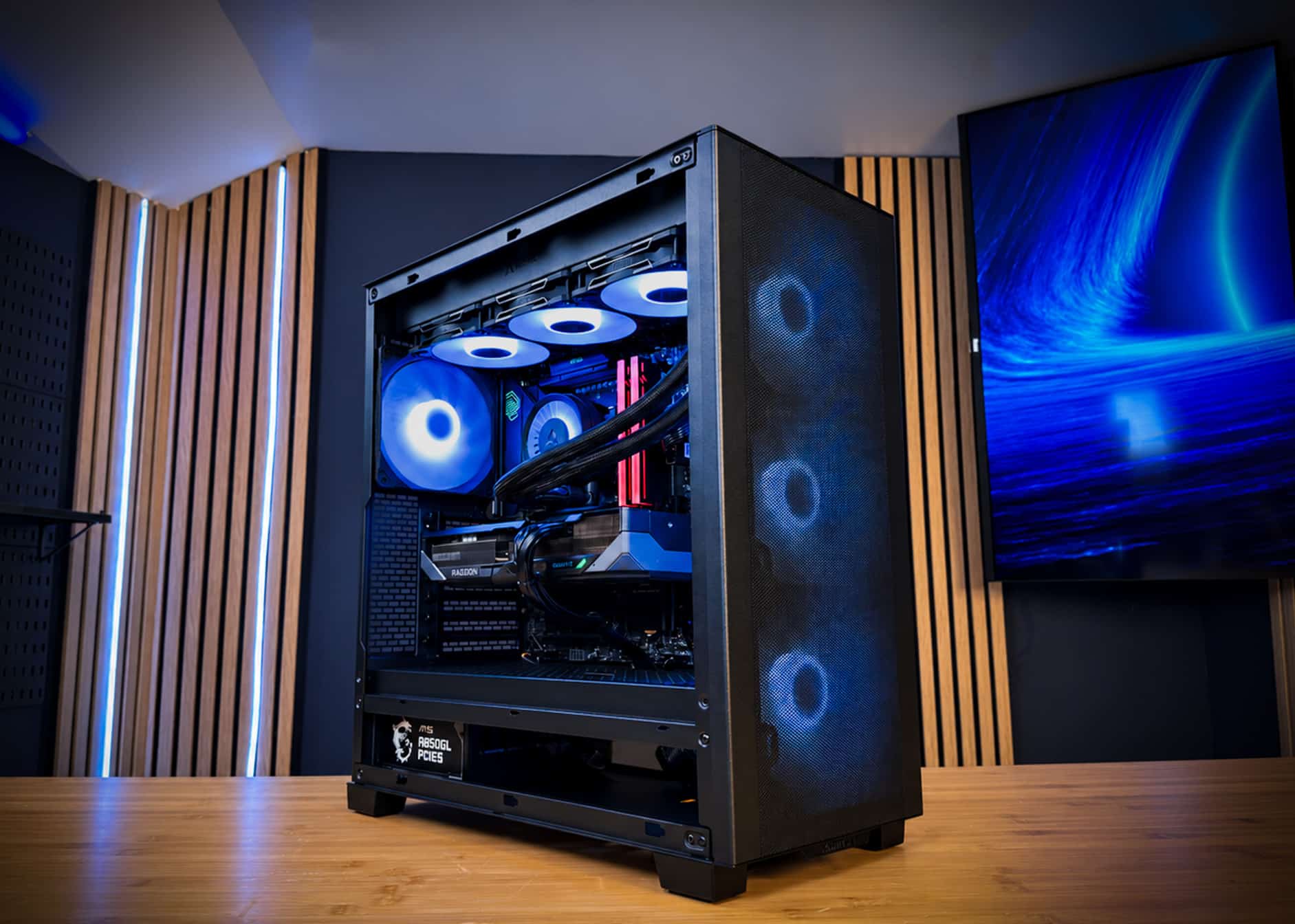
That is why our in-stock OCEAN build uses an ARCTIC Liquid Freezer III Pro A-RGB 360. Below we explain when each option makes sense, what it costs, and the mistakes that matter more than the cooler type.
How much cooling does the 9800X3D need?
It needs a cooler comfortably rated above its 120W TDP, which rules out small stock-style coolers but not good air coolers.
A 120W TDP is moderate for a modern desktop chip. Gaming rarely loads all 16 threads at once, so real gaming draw sits well below a full stress test. The heavy moments come from shader compilation, long loading screens, rendering and benchmarks.
Ryzen processors boost based on temperature and power headroom. A cooler that keeps the chip further from its limits lets it hold higher clocks for longer. With a 9800X3D, though, the difference between a strong air cooler and an AIO in games is usually small. The bigger gains show up in noise and sustained all-core work.
What actually loads the CPU
- Esports at high refresh: steady, moderate load on a few cores.
- AAA games: spiky load, heaviest during shader compilation and loading.
- Streaming and encoding: sustained multi-core load, where cooling headroom helps most.
- Stress tests and renders: the worst case your cooler must handle without throttling.
Air cooling: pros and cons
A dual-tower air cooler is the cheapest, simplest and most durable way to cool a 9800X3D well.
Why choose air
- Fewer failure points: no pump, no tubing, no coolant. The fans are the only moving parts, and they are cheap to replace.
- Lower cost: a strong dual-tower cooler usually costs less than a good 360mm AIO.
- Easy maintenance: blow out dust every few months and it keeps working.
Where air falls short
- Size: big dual-tower coolers are often 155mm to 165mm tall. Check case clearance and RAM height.
- Heat stays in the case: CPU heat is dumped inside, then exhausted by case fans.
- Noise under long loads: fans ramp up more during sustained work than a 360mm radiator’s fans do.
- Looks: a large tower can block the view of the motherboard and memory.
Single-tower coolers are fine for gaming at stock settings but have less margin. For a 9800X3D we’d pick a dual-tower model.
Liquid cooling: pros and cons
A 360mm AIO gives the most headroom and quietest sustained performance, at a higher price and with a pump that can wear out.
Why choose an AIO
- More surface area: a 360mm radiator uses three 120mm fans spread across the case edge.
- Quieter under load: more radiator area lets fans spin slower for the same heat.
- Heat goes out directly: a top-mounted radiator exhausts CPU heat straight out of the case.
- Clean look: the area around the socket stays open, so memory and the board are visible.
Where liquid falls short
- Cost: a good 360mm AIO generally costs more than a top air cooler.
- Pump wear: the pump is a moving part that will eventually fail. It is the main long-term risk.
- Mounting matters: the pump should not sit at the highest point of the loop, or air can collect there.
- Case fit: you need a case with room for a 360mm radiator, ideally on top.
With a 9800X3D, the cooler choice is less about temperatures and more about noise, case fit and non-gaming workloads.
Air vs liquid side by side
For a 9800X3D, a dual-tower air cooler and a 360mm AIO are both safe picks; they differ mainly in price, noise and case fit.
| Cooler type | Typical price (approx.) | Fans | Fit for 120W 9800X3D | Noise under long loads |
|---|---|---|---|---|
| Single-tower air | ~$30 to $50 | 1 x 120mm | OK for gaming, little margin | Highest |
| Dual-tower air | ~$60 to $110 | 2 x 120mm or 140mm | Good | Moderate |
| 240mm AIO | ~$80 to $130 | 2 x 120mm | Good | Moderate |
| 360mm AIO | ~$100 to $180 | 3 x 120mm | Best headroom | Lowest |
Prices are rough US ranges as of mid-November 2026 and vary by brand. Unlike GPUs and DDR5, coolers have not been hit by the memory shortage. That makes the cooler one of the easier upgrades to justify.
A dual-tower air cooler is enough for a 9800X3D gaming PC. A 360mm AIO buys quieter long sessions and more headroom for streaming, encoding and rendering.
Don’t forget the GPU and case airflow
The graphics card makes far more heat than the 9800X3D, so case airflow often matters more than the CPU cooler.
An RX 9070 XT has a 304W board power. An RTX 5080 is rated at 360W, and an RTX 5090 at 575W. Each of those dumps more heat into the case than a 120W CPU. If that heat has nowhere to go, both coolers suffer.
Airflow rules that apply to both
- Front intake, top and rear exhaust: the simplest layout for most gaming cases.
- Top-mounted radiator as exhaust: keeps GPU heat from being pulled through the radiator.
- Front-mounted radiator as intake: fine, but it feeds slightly warmer air to the GPU.
- Clean cable routing: fewer cables in the path means freer airflow.
Power draw also affects your PSU choice. For sizing, see what power supply you need for a gaming PC.
Why OCEAN uses a 360mm AIO
We use a 360mm AIO in OCEAN for quiet, consistent cooling across long sessions and full-load testing.
OCEAN pairs a Ryzen 7 9800X3D with an ARCTIC Liquid Freezer III Pro A-RGB 360 in a Phanteks XT PRO ULTRA case. The radiator spreads CPU heat across three 120mm fans. That leaves headroom for streaming or encoding on top of gaming, not just stock gaming loads.
Every OCEAN goes through a 48-hour burn-in under full load before shipping. That run stresses the CPU, GPU, cooler and power supply together. It is how we confirm the pump, fans and mounting behave before the PC reaches you. Learn more in what 48-hour burn-in testing is.
All parts are standard retail components. If the AIO ever needs replacing years from now, it is a normal, swappable part.
The cooler only matters if it is mounted, routed and tested properly. A 48-hour full-load burn-in catches mounting and pump problems before the PC ships.
Which should you pick?
Pick air for simplicity and value, and pick a 360mm AIO for quiet, long sessions and heavier workloads.
- Pick dual-tower air if you mostly game, want the lowest long-term maintenance, and your case has the height clearance.
- Pick a 360mm AIO if you stream, encode or render, want lower noise under load, or prefer an open look around the socket.
- Pick a 240mm AIO if your case cannot fit a 360mm radiator but you still want liquid cooling.
- Avoid small single-tower coolers unless the build is tight on space and budget.
Whatever you choose, the CPU itself is the right one. We explain why in is the Ryzen 7 9800X3D still the best gaming CPU? If you are pricing a full system, our best gaming PC under $3,000 guide shows where the money goes in 2026.
Looking for a 9800X3D gaming PC?
If you want the 360mm AIO approach without sourcing parts, OCEAN is ready now. It pairs the 9800X3D and ARCTIC 360mm AIO with an RX 9070 XT and 32GB of DDR5-6000. DDR5 kits alone now run about $450.
- CPU AMD Ryzen 7 9800X3D
- GPU Gigabyte Radeon RX 9070 XT 16GB GAMING OC
- Motherboard MSI MAG B850 TOMAHAWK MAX WIFI
- Memory Lexar THOR Z OC 32GB DDR5-6000
- Storage Kingston NV3 2TB NVMe
- Cooling ARCTIC Liquid Freezer III Pro A-RGB 360
- Case Phanteks XT PRO ULTRA
- Power MSI MAG A850GL 850W 80+ Gold
- OS Windows 11 Pro
OCEAN ships within 5–7 business days. It is hand-assembled in Jersey City, cable-managed and burned in for 48 hours under full load. You get a 3-year parts warranty, lifetime support and fully insured shipping to all 50 states. Affirm financing with 0% APR options is available for qualified buyers.
Need a different spec, like an air-cooled build or an RTX 5080 or RTX 5090 system? Tell us on the request form and you’ll get a parts plan and quote within 24 hours. GPU street prices change daily, so availability and price are confirmed in your quote. Or browse all of our prebuilt gaming PCs.
Frequently asked questions
Is an air cooler enough for the Ryzen 7 9800X3D?
Yes, for gaming. The 9800X3D has a 120W TDP, and a quality dual-tower air cooler handles that comfortably. Small single-tower coolers work but leave little margin. If you also stream, encode or render for long periods, a 360mm AIO gives more headroom and less noise.
Does liquid cooling give more FPS with a 9800X3D?
Usually only a little, if at all. In games, a strong air cooler and a 360mm AIO perform similarly with a 9800X3D. The AIO’s advantages are lower noise during long sessions and more headroom for sustained multi-core work like encoding, rendering and stress tests.
Is a 240mm AIO enough, or do I need 360mm?
A 240mm AIO is enough for a 9800X3D in gaming. A 360mm radiator adds a third 120mm fan and more surface area. That lets the fans spin slower for the same heat, so it runs quieter under heavy load. Choose 360mm if your case fits it.
Are AIO liquid coolers risky?
The main risk is pump wear over time, not leaks in normal use. Mount the radiator so the pump is not the highest point in the loop. A full-load burn-in before shipping helps catch mounting or pump problems early. Air coolers avoid pumps entirely, so they have fewer failure points.
Which cooler does the CPUBLD OCEAN use?
OCEAN uses an ARCTIC Liquid Freezer III Pro A-RGB 360 to cool its Ryzen 7 9800X3D inside a Phanteks XT PRO ULTRA case. Every unit runs a 48-hour burn-in under full load before shipping. It ships within 5–7 business days with a 3-year parts warranty.


