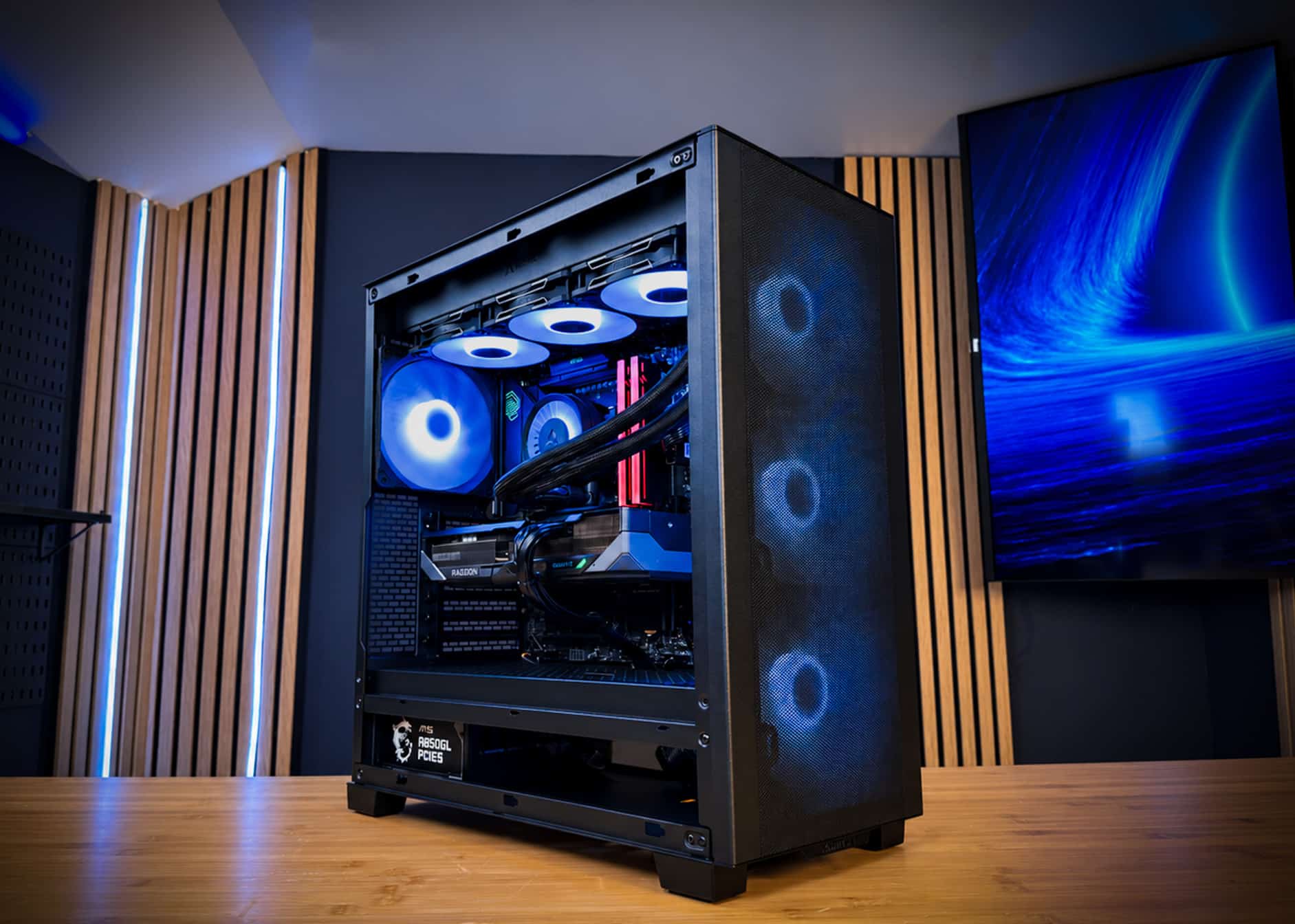
Burn-in testing means running a newly built PC at sustained heavy load for hours before it reaches you. The goal is to make weak parts, unstable settings and assembly mistakes show up on the bench instead of in your first week of gaming. A 48-hour burn-in keeps the CPU, GPU, memory, cooling and power supply working hard for two full days. The short version: a quick boot test proves a PC turns on. A 48-hour full-load burn-in shows a Ryzen 7 9800X3D, a 304W RX 9070 XT and 32GB of DDR5-6000 can run hot and stable for days.

What burn-in testing actually is
Burn-in testing is a long, deliberate stress period that pushes a new system to full load and keeps it there.
The idea comes from electronics manufacturing. New components tend to fail in a familiar pattern. A small share fail early, most then run reliably for years, and failures rise again only near end of life. Engineers call this the “bathtub curve.”
Burn-in targets the left side of that curve. By running the hardware hard before shipping, a builder gives early-failure parts the chance to fail on the bench. It also exposes problems that are not defects at all. Examples include a slightly unstable memory profile or a fan curve that can’t keep up.
In general terms, a burn-in session covers four areas:
- CPU load: all cores working at once, for long periods, to test the chip, motherboard power delivery and CPU cooler.
- GPU load: a sustained 3D workload that keeps the graphics card at its full power target.
- Memory: repeated read and write patterns that reveal errors at the rated speed.
- Monitoring: watching temperatures, clocks and system logs for throttling, errors or crashes.
Why 48 hours instead of a quick test
Forty-eight hours matters because many real faults only appear after heat has built up and stayed there.
A 10-minute stress run tells you the PC can start a heavy workload. It does not tell you what happens after the case interior, the radiator coolant and the power supply all reach steady-state temperature. That takes time. Some faults are intermittent too. A memory error that appears once every few hours will almost never show up in a short test.
Long sessions also mirror how people actually use a gaming PC. A weekend of play, a long stream or an overnight shader compile keeps the system busy for hours. A burn-in that runs for two days covers that pattern with room to spare.
A quick test proves the PC works. A 48-hour full-load burn-in proves it keeps working when it is hot, busy and has been that way for a long time.
Short tests catch dead parts. Long tests catch the subtle ones: intermittent memory errors, heat soak, slow pump or fan problems and power supply instability under hours of load.
What a burn-in can catch
A burn-in catches the problems most likely to cause crashes, throttling or an early return in the first weeks of ownership.
Memory problems
- A faulty DDR5 stick that passes a boot check but throws errors under sustained load.
- A DDR5-6000 profile that is marginal on a given CPU and motherboard combination.
- Symptoms caught early: random game crashes, corrupted files and blue screens.
Cooling problems
- An AIO pump that is weak, noisy or slow to circulate coolant.
- Uneven thermal paste or cooler mounting pressure that raises CPU temperature.
- Case airflow that lets GPU heat build up until clocks drop.
Power and connection problems
- A power supply that becomes unstable when CPU and GPU both draw full power for hours.
- A loose power or data cable that causes intermittent faults only under sustained load.
- On cards with 12V-2×6 connectors, poor seating is a known risk. A burn-in is not a fix for that. Correct installation is, as our melting connector guide explains.
Storage and software problems
- An NVMe SSD that reports errors or drops off the system under heavy use.
- Driver or BIOS issues that cause crashes after hours of load.
What gets stressed in a high-end build
In a high-end gaming PC, burn-in stresses every part that turns power into heat.
The table below uses OCEAN’s actual parts to show what a full-load test is pushing. The numbers are the manufacturers’ power and spec figures.
| Component | Part in OCEAN | Key spec | What full load tests |
|---|---|---|---|
| CPU | AMD Ryzen 7 9800X3D | 8 cores, 16 threads, 120W TDP | All-core stability, board power delivery |
| GPU | Gigabyte Radeon RX 9070 XT 16GB GAMING OC | 304W board power, 16GB GDDR6 | Sustained clocks, VRAM stability, fan behavior |
| Memory | Lexar THOR Z OC 32GB DDR5-6000 | 32GB at 6000 MT/s | Error-free operation at rated speed |
| Cooling | ARCTIC Liquid Freezer III Pro A-RGB 360 | 360mm radiator | Pump and fan performance under heat soak |
| Power supply | MSI MAG A850GL 850W 80+ Gold | 850W rated output | Stable delivery with CPU and GPU at full draw |
| Storage | Kingston NV3 2TB NVMe | 2TB NVMe | Drive health and stable operation |
The same logic applies to bigger builds. An RTX 5080 is rated at 360W and an RTX 5090 at 575W, with NVIDIA recommending 850W and 1000W supplies. More power means more heat, which makes a long test more valuable, not less. For PSU sizing, see our power supply guide.
What burn-in cannot do
Burn-in reduces early failures, but it cannot promise that no part will ever fail.
Some parts wear out over years, and burn-in does not change that. It also cannot predict shipping damage, though good packing and insured shipping cover that risk. And it won’t protect against later changes, such as a new driver, a BIOS update or a user-installed overclock.
That is why burn-in works best alongside two other things: standard retail parts that are easy to replace, and a real warranty. A test plus coverage is what lowers your risk. For how long a well-built system lasts, read how long a gaming PC lasts.
Treat burn-in as a filter, not a guarantee. It removes most early-failure risk before shipping, and a multi-year parts warranty covers what remains.
How to burn-in test your own PC
You can run a basic burn-in at home with free stress and monitoring tools and a free afternoon or weekend.
A simple home routine
- Install a hardware monitor first, so you can log CPU and GPU temperatures, clocks and fan speeds.
- Run a CPU stress test for at least an hour and watch for errors, crashes or throttling.
- Run a looping GPU benchmark or stress test for an hour or more at your normal resolution.
- Run a memory test, ideally overnight, to look for errors at your rated DDR5 speed.
- Finish with a combined CPU and GPU load to test the power supply and case airflow together.
What to watch for
- Any reported error, crash, reboot or blue screen.
- Clocks that fall steadily as temperatures climb, which points to a cooling limit.
- Fans that ramp to maximum and stay there, or a pump that grows noisy.
Doing this yourself takes time and some experience reading the results. It is also one of the reasons many buyers choose a tested prebuilt. Our 10 checks for spotting a cheap prebuilt list stated testing as a key sign of quality.
Why burn-in matters more in 2026
Burn-in matters more this year because replacement parts are expensive and slow to find.
A memory shortage driven by AI data centers has pushed component prices up sharply. As of mid-November 2026, Tom’s Hardware put a 32GB DDR5-6000 kit at about $450, compared with well under $150 in 2025. RTX 5080 cards sell for roughly $1,800 to $2,300+ against a $999 launch price. Silicon Motion expects shortages to last until 2028.
When one stick of RAM or one GPU costs this much, a failure in week two is painful. A dead part also means waiting for a replacement in a tight market. Catching that fault before shipping saves you the downtime. For the market picture, see DDR5 prices in 2026 and why prebuilts are the better deal in 2026.
Looking for a gaming PC that’s already been burn-in tested?
Every CPUBLD build gets a 48-hour burn-in under full load before it ships, and OCEAN is the in-stock option. It pairs the Ryzen 7 9800X3D with a 16GB RX 9070 XT, 32GB of DDR5-6000 and a 360mm liquid cooler.
- CPU AMD Ryzen 7 9800X3D
- GPU Gigabyte Radeon RX 9070 XT 16GB GAMING OC
- Motherboard MSI MAG B850 TOMAHAWK MAX WIFI
- Memory Lexar THOR Z OC 32GB DDR5-6000
- Storage Kingston NV3 2TB NVMe
- Cooling ARCTIC Liquid Freezer III Pro A-RGB 360
- Case Phanteks XT PRO ULTRA
- Power MSI MAG A850GL 850W 80+ Gold
- OS Windows 11 Pro
OCEAN ships within 5–7 business days. It is hand-assembled and cable-managed in Jersey City and runs a 48-hour burn-in under full load before it leaves. You get a 3-year parts warranty, lifetime support and fully insured shipping to all 50 states. Affirm financing offers 0% APR options for qualified buyers.
Need a different spec, like a burn-in tested RTX 5080 or RTX 5090 build? Tell us on the request form and you’ll get a parts plan and quote within 24 hours. Or browse all of our prebuilt gaming PCs.
Frequently asked questions
What is a PC burn-in test?
A PC burn-in test runs a new computer at sustained heavy load for many hours. It stresses the CPU, GPU, memory, cooling and power supply together. The goal is to expose weak parts, unstable settings and assembly mistakes before the owner starts gaming, rather than during the first weeks.
How long should a burn-in test last?
Longer is better for catching intermittent faults. A few minutes only proves the PC can start a heavy workload. Several hours lets heat build to steady state. CPUBLD runs every build under full load for 48 hours, which gives rare memory errors and cooling problems time to appear before shipping.
Can a burn-in test damage a new PC?
A properly cooled PC is designed to run at full load, so a burn-in should not harm healthy parts. Components have built-in temperature and power limits. If a part fails during the test, it was likely defective or close to failing anyway. That is exactly what the test is meant to find.
Does burn-in testing mean a PC will never fail?
No. Burn-in removes much of the early-failure risk, but it cannot stop parts from wearing out over years. It also cannot prevent shipping damage or problems from later updates. That is why a tested build should also come with a real parts warranty and support you can reach.
Should I burn-in test a PC I built myself?
Yes, it is a good habit. Run a CPU stress test, a looping GPU test and an overnight memory test while monitoring temperatures and clocks. Watch for crashes, errors and steadily falling clocks. Finding a bad memory stick or a weak cooler early makes a return far easier.


