
You can tell if a prebuilt is good by reading the parts list, not the GPU sticker. A cheap prebuilt spends on one headline part, like an RX 9070 XT or RTX 5070 Ti. It saves on everything you can’t see. The short version: a solid build names every part and uses an 80+ Gold PSU sized for the GPU. Expect 32GB of dual-channel DDR5-6000, a named B850-class board, a TLC NVMe SSD, a real cooler and a mesh-front case. If a listing says “650W PSU” or “16GB RAM” with no brand, the builder cut a corner.
Below are 10 checks you can run on any listing in about five minutes.
Why cheap prebuilts cut corners in 2026
Builders cut corners because GPU and memory prices jumped, and a listing still has to hit an eye-catching price.
The squeeze is real. As of mid-November 2026, Tom’s Hardware put a 32GB DDR5-6000 kit at about $450. That same kind of kit was well under $150 in 2025. GPUs went the same way. The RTX 5070 Ti launched at $749, yet Digital Citizen spotted it at $1,169.99 on Newegg in October 2026. RTX 5080 cards sell for roughly $1,800 to $2,300+ against a $999 launch price.
The cause is a memory shortage. AI data centers are buying DRAM and HBM years ahead, and Silicon Motion expects shortages to last until 2028. So a builder who wants a “$1,999 RTX gaming PC” has two choices: raise the price or quietly downgrade the rest of the box.
For the full cost picture, see our breakdown of what it costs to build a gaming PC in 2026.
Checks 1 to 3: power supply, motherboard and memory
These three parts decide whether the PC stays stable for years, and they are the easiest places to hide savings.
Check 1: A named power supply with real headroom
- Look for a brand, a model and an efficiency rating, such as “MSI MAG A850GL 850W 80+ Gold.”
- Match wattage to the GPU. NVIDIA recommends 850W for an RTX 5080 and 1000W for an RTX 5090.
- An RX 9070 XT draws 304W of board power, so 750W to 850W Gold is a sensible floor with a 9800X3D.
- For 12V-2×6 cards, ask for an ATX 3.1 unit with a native cable and no adapters.
“650W PSU” with no brand is the single biggest red flag on a spec sheet. Our power supply guide covers sizing in more detail.
Check 2: A named motherboard with the right chipset
- A good listing names the exact board, like “MSI MAG B850 TOMAHAWK MAX WIFI.”
- “AMD B650 motherboard” or “Intel chipset board” usually means the cheapest model with basic power delivery.
Check 3: 32GB of dual-channel DDR5
- Expect 32GB as two 16GB sticks. One 16GB stick runs in single-channel mode and halves memory bandwidth.
- Look for a speed, ideally DDR5-6000 on AM5, and a named kit.
- With 32GB kits near $450 to $550, 16GB is the most common corner cut this year.
If the PSU, motherboard or RAM line has no brand and model, assume it is the cheapest part the builder could source. Ask before you buy, and walk away if they won’t say.
Checks 4 to 6: storage, cooling and airflow
Storage and cooling problems don’t show up on day one, which is exactly why cheap builders skimp on them.
Check 4: A real NVMe SSD, at least 1TB
- Look for a named NVMe drive, such as “Kingston NV3 2TB NVMe.” Modern games often take 100GB or more each.
- “512GB SSD” fills up after a handful of AAA installs.
- Unnamed drives are often DRAM-less QLC models that slow down sharply during large copies.
Check 5: A cooler that matches the CPU
- The Ryzen 7 9800X3D has a 120W TDP. It wants a strong tower cooler or a 240mm to 360mm liquid cooler.
- “Stock cooler” or no cooler listed on a high-end CPU means louder fans and higher temps.
- A named cooler, like an ARCTIC Liquid Freezer III Pro 360, shows the builder planned for sustained load.
Check 6: A case that can actually breathe
- Look for a mesh front panel and at least three included fans.
- A solid glass front with one rear fan traps GPU heat. Clocks drop and fans spin up.
For cooler choices on AM5, see air vs liquid cooling for the 9800X3D.
Red flags vs green flags at a glance
Use this table as a quick filter when comparing two listings at a similar price.
| Part | Cheap prebuilt red flag | What a solid build lists |
|---|---|---|
| Power supply | “650W PSU”, no brand or rating | Named 850W 80+ Gold, ATX 3.1 for 12V-2×6 cards |
| Motherboard | “B650 motherboard”, no model | Exact model, e.g. B850 with Wi-Fi |
| Memory | 16GB, single stick, no speed | 32GB (2x16GB) DDR5-6000 |
| Storage | 512GB “SSD” | Named 1TB to 2TB NVMe |
| CPU cooler | “Stock cooler” or not listed | Named tower or 240mm to 360mm AIO |
| Case | Glass front, 1 fan | Mesh front, 3+ fans |
| GPU | “RTX 50 series graphics” | Brand, model and VRAM, e.g. RX 9070 XT 16GB |
| Testing | Not mentioned | Stated burn-in under full load |
| Warranty | 1 year, parts only | Multi-year parts plus support |
Checks 7 and 8: the GPU listing and the CPU pairing
The GPU should be named down to the board partner, and the CPU should be strong enough to feed it.
Check 7: The exact GPU model and VRAM
- “RTX 5070 Ti or equivalent” lets the builder swap in whatever is cheapest that week.
- Look for a brand, model and memory size, such as “Gigabyte Radeon RX 9070 XT 16GB GAMING OC.”
- 16GB of VRAM is a sensible floor for 1440p and 4K in 2026. The RX 9070 XT, RTX 5070 Ti and RTX 5080 all have it.
- Compare the price to GPU street prices. If the whole PC costs barely more than the card, something else is weak.
Check 8: A CPU that won’t hold the GPU back
- A high-end GPU paired with an entry-level six-core CPU leaves frames on the table, especially at 1080p and 1440p.
- For gaming, the Ryzen 7 9800X3D is the reference point: 8 cores, 16 threads and 96MB of L3 cache.
A good prebuilt is not the one with the biggest GPU name. It is the one where every part on the sheet is named, matched and tested.
Checks 9 and 10: build quality, testing and support
The last two checks are about how the PC was put together and what happens if something fails.
Check 9: Standard parts and clean cable management
- Ask for interior photos of the actual model. Tidy cables help airflow and make upgrades easy.
- Standard ATX parts mean you can swap a PSU or GPU later. Proprietary boards and power supplies lock you in.
- On 12V-2×6 GPUs, the cable should be fully seated with no sharp bend near the plug. Our melting connector guide explains why.
- Check for bloatware. A clean Windows 11 install saves you an evening of uninstalling trials.
Check 10: Stated testing and a real warranty
- Ask whether the PC is stress-tested under full load before shipping, and for how long.
- A short power-on check catches dead parts. A long burn-in catches unstable memory, weak cooling and early failures. See what 48-hour burn-in testing is.
- Look for multi-year parts coverage and a clear way to reach support.
Two PCs with the same GPU can be very different machines. Named parts, a 32GB dual-channel kit, a Gold PSU and documented burn-in testing are what separate a good prebuilt from a cheap one.
Is a cheaper prebuilt ever worth it?
Yes, if the savings come from a smaller GPU or less storage rather than hidden weak parts.
A build with an RX 9070 XT instead of an RTX 5080 can be a smart trade. AMD prices rose less this year, with RX 9070 XT listings around $700 to $1,000 versus roughly $1,800 to $2,300+ for an RTX 5080. That gap buys a better PSU, more RAM and better cooling.
A build that saves money with a no-name PSU and one stick of RAM is not a bargain. It is a repair bill waiting to happen. If you are weighing building versus buying, read why prebuilts are the better deal in 2026 and our prebuilt vs custom comparison.
Accept a smaller GPU before you accept a weaker power supply, single-channel memory or an untested build. The GPU is easy to upgrade later; a bad foundation is not.
Looking for a gaming PC that passes all 10 checks?
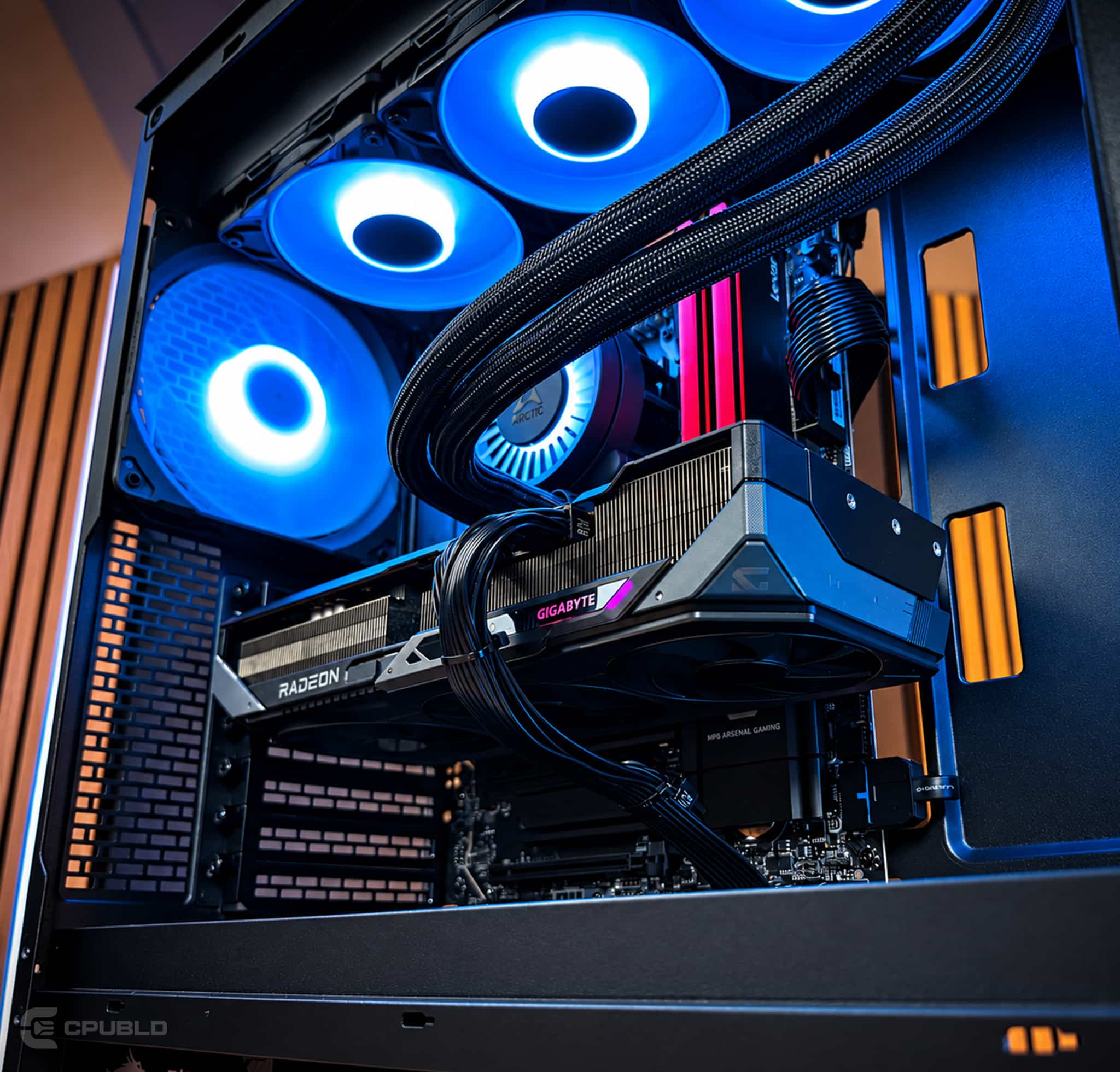
OCEAN is built to pass every check above. Every part is named, the PSU is an 850W Gold unit, memory is 32GB of DDR5-6000, and the RX 9070 XT has 16GB of VRAM. The Ryzen 7 9800X3D is cooled by a 360mm liquid cooler in a mesh-front Phanteks case.
- CPU AMD Ryzen 7 9800X3D
- GPU Gigabyte Radeon RX 9070 XT 16GB GAMING OC
- Motherboard MSI MAG B850 TOMAHAWK MAX WIFI
- Memory Lexar THOR Z OC 32GB DDR5-6000
- Storage Kingston NV3 2TB NVMe
- Cooling ARCTIC Liquid Freezer III Pro A-RGB 360
- Case Phanteks XT PRO ULTRA
- Power MSI MAG A850GL 850W 80+ Gold
- OS Windows 11 Pro
OCEAN ships within 5–7 business days. It is hand-assembled and cable-managed in Jersey City, then put through a 48-hour burn-in under full load. It comes with a 3-year parts warranty, lifetime support and fully insured shipping to all 50 states. Affirm financing offers 0% APR options for qualified buyers.
Need a different spec, like an RTX 5080 or RTX 5090 build with the same named-parts approach? Tell us on the request form and you’ll get a parts plan and quote within 24 hours. Or browse all of our prebuilt gaming PCs.
Frequently asked questions
How can I tell if a prebuilt gaming PC is good?
Read the full parts list. A good prebuilt names the brand and model of the power supply, motherboard, memory, SSD, cooler and case. Look for an 80+ Gold PSU sized for the GPU, 32GB of dual-channel DDR5, a 1TB or larger NVMe drive and stated stress testing.
What is the biggest red flag on a prebuilt spec sheet?
An unnamed power supply is the biggest red flag. A line like “650W PSU” with no brand or efficiency rating usually means the cheapest unit available. The PSU feeds every other part, so a weak one can cause crashes, shutdowns or damage under a heavy gaming load.
Is 16GB of RAM enough in a prebuilt gaming PC?
It works, but 32GB is the better target for a new gaming PC in 2026. Many cheap builds ship 16GB as a single stick, which runs in single-channel mode and cuts bandwidth. With DDR5 prices high, memory is one of the most common places builders save money.
Does a prebuilt need a liquid cooler?
Not always. A strong tower air cooler can handle a gaming CPU well. What matters is that the cooler is named and matched to the processor. A high-end CPU like the Ryzen 7 9800X3D with an unnamed stock cooler is a sign the builder skipped thermal planning.
Why does burn-in testing matter when buying a prebuilt?
Burn-in testing runs the PC under sustained heavy load before it ships. It helps expose unstable memory, weak cooling, loose connections and parts that fail early. A quick power-on check only proves the PC boots, while a long full-load test shows it can actually handle gaming.


